Enabling Dark Mode on the Field Worker App
Follow
Best Suited for:
- Field techs working in low-light environments
- Field techs who prefer a modern, low-glare interface
- Mobile users looking to conserve battery life
Important Information:
Strategic Workflow:
- Access display settings in the mobile app
- Choose your preferred appearance mode
Step-by-Step Instruction:
- Open the Service Fusion mobile app
- Tap your initials icon in the top left corner
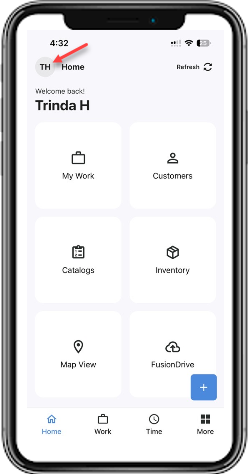
- Go to Settings > Display and Appearance
- Choose one of the following:
-
Light for standard display
-
Dark for low-light environments
-
Auto to match your device’s system theme
- Your selected display mode will be applied immediately