Rolling Back a Technician’s Status Update
Follow
Best Suited for:
- Back Office Administrators
- Dispatchers
- Users performing job management
Important Information:
- Status rollbacks can only be performed from the back office
- Rolling back a status reverts the technician’s status to the previous status
- The page will refresh automatically after the rollback is completed
- Drive and Labor entries will be affected if changing to an applicable status
- Status update communications will send out if applicable on the status that you are selecting
Strategic Workflow:
- Use this process when a technician updates a job status by mistake
- Always verify the correct status after the rollback completes
Step‑by‑Step Instruction:
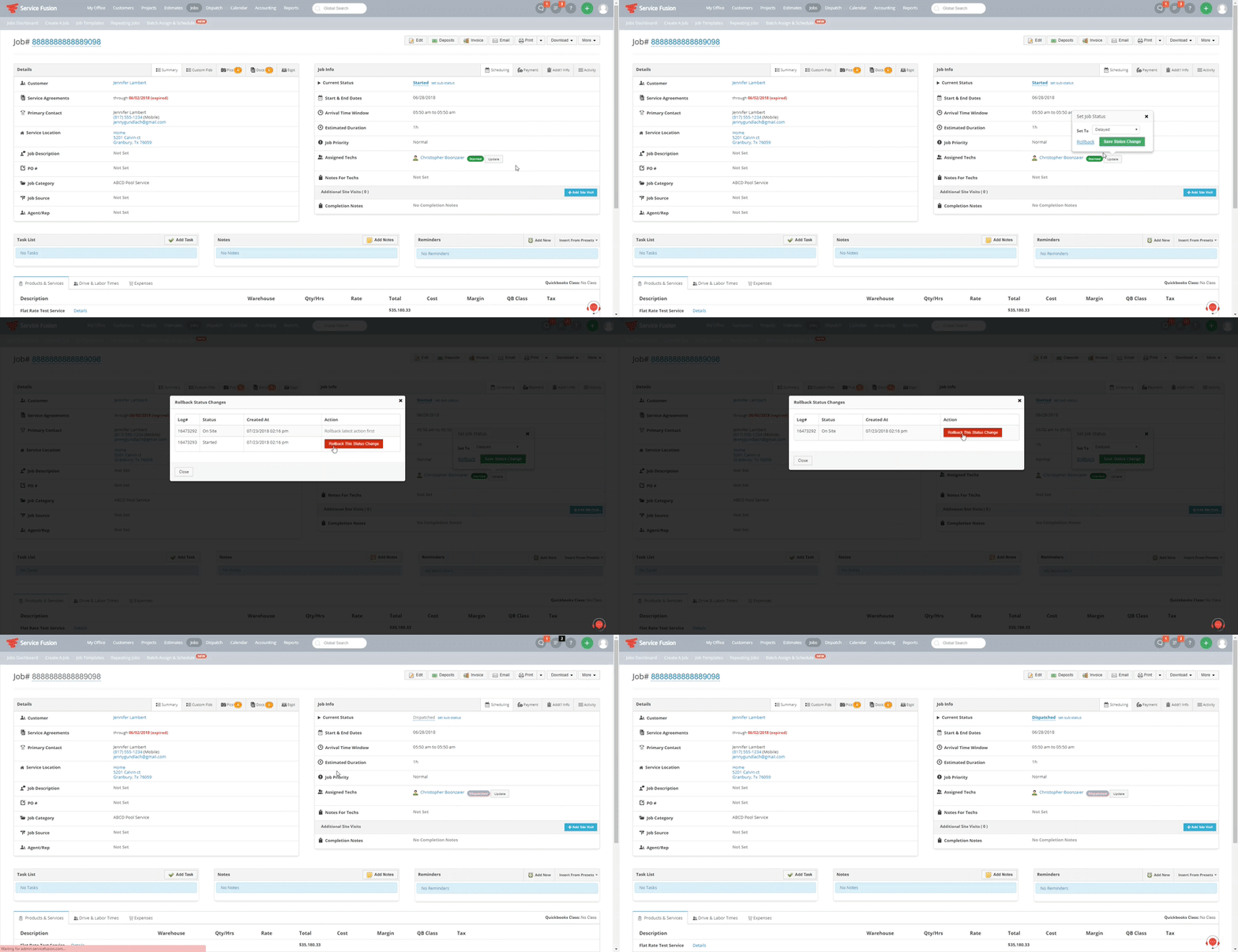
- Open the job
- Locate the technician’s status section
- Click the Update button next to the technician’s status
- Select Rollback
- A confirmation window will appear
- Click the Rollback This Status Change button in the confirmation window to revert the job to the previous status
- Click Yes and Close
- Allow the page to refresh automatically
- The technician's status should now reflect the previous status